
Apple HomeView Announced: A Smarter, More Personal Way to Manage Your Home
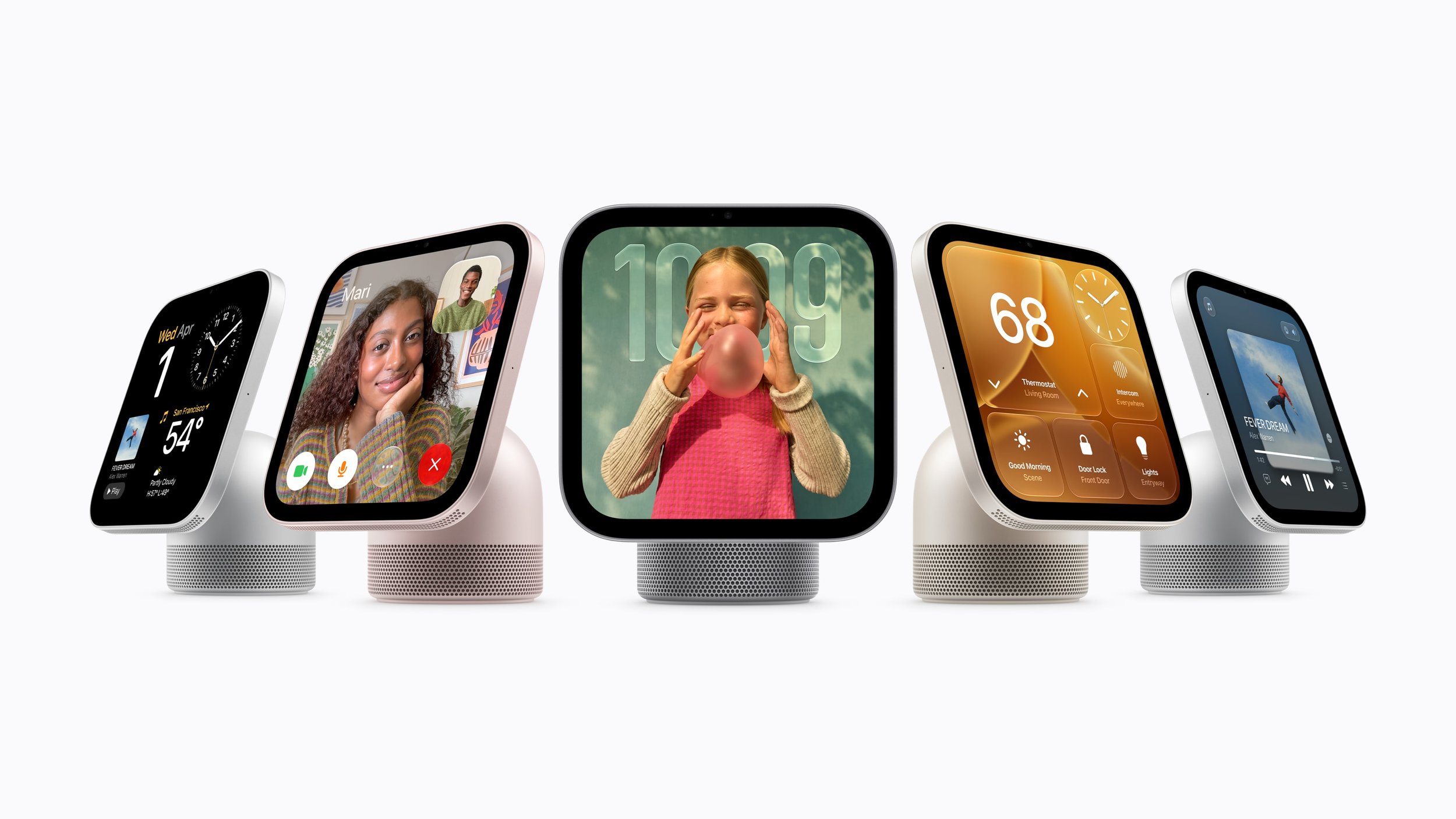
Apple HomeView brings AI-powered Siri, a 7-inch Liquid Retina display, smart home controls, FaceTime, entertainment and personalised experiences into one device, with Australian pricing starting at $449.
Apple has officially unveiled Apple HomeView, a new smart home device designed to bring entertainment, communication and home automation together in one convenient place. Announced on 14 October 2026, HomeView combines a 7-inch Liquid Retina display, an enhanced Siri AI assistant, high-quality audio and smart home management features in a device designed to become a central part of everyday life.
Whether you're checking who's at the front door, making a FaceTime call with family, following a recipe in the kitchen or controlling your smart lights with your voice, Apple HomeView aims to make managing a connected home easier and more personal.
One of its biggest selling points is its ability to recognise different household members, providing personalised information and experiences while helping protect each person's privacy. Powered by Apple's A18 chip and the next generation of Apple Intelligence, HomeView also introduces a more conversational version of Siri that can answer questions, discover music and, when paired with a compatible device, provide more personalised assistance.
With Australian pricing starting at $449, here's everything you need to know about Apple HomeView, its features, benefits and whether it could be a worthwhile addition to your home.
What Is Apple HomeView?
Apple HomeView is a smart home display designed to bring several everyday technologies together into one device. Think of it as a central dashboard for your home, combining the convenience of a voice assistant with a touchscreen interface, a home entertainment system and controls for compatible smart home accessories.
Rather than reaching for your iPhone every time you want to check a reminder, adjust the lighting or see a camera feed, HomeView lets you access many of these functions from a convenient location around the house.
Its key capabilities include:
Siri AI and Apple Intelligence: Ask questions, discover music and interact with a more conversational voice assistant.
Smart home control: Adjust lights, lock compatible doors, close blinds and view connected security cameras.
Entertainment: Listen to music, enjoy podcasts, watch supported video content and experience room-filling audio.
Communication: Make FaceTime calls, read and reply to Messages, and broadcast announcements around the home.
Personalised experiences: Give up to six recognised household members their own Home Screen, apps and widgets.
Home monitoring: View multiple camera feeds and receive supported security and safety notifications.
Flexible placement: Choose a tabletop model or a wall-mounted version to suit your living space.
The idea is to make useful information and everyday controls available at a glance, without requiring everyone in the household to use the same screen in the same way.
Design and Display: Built to Fit Into Your Home
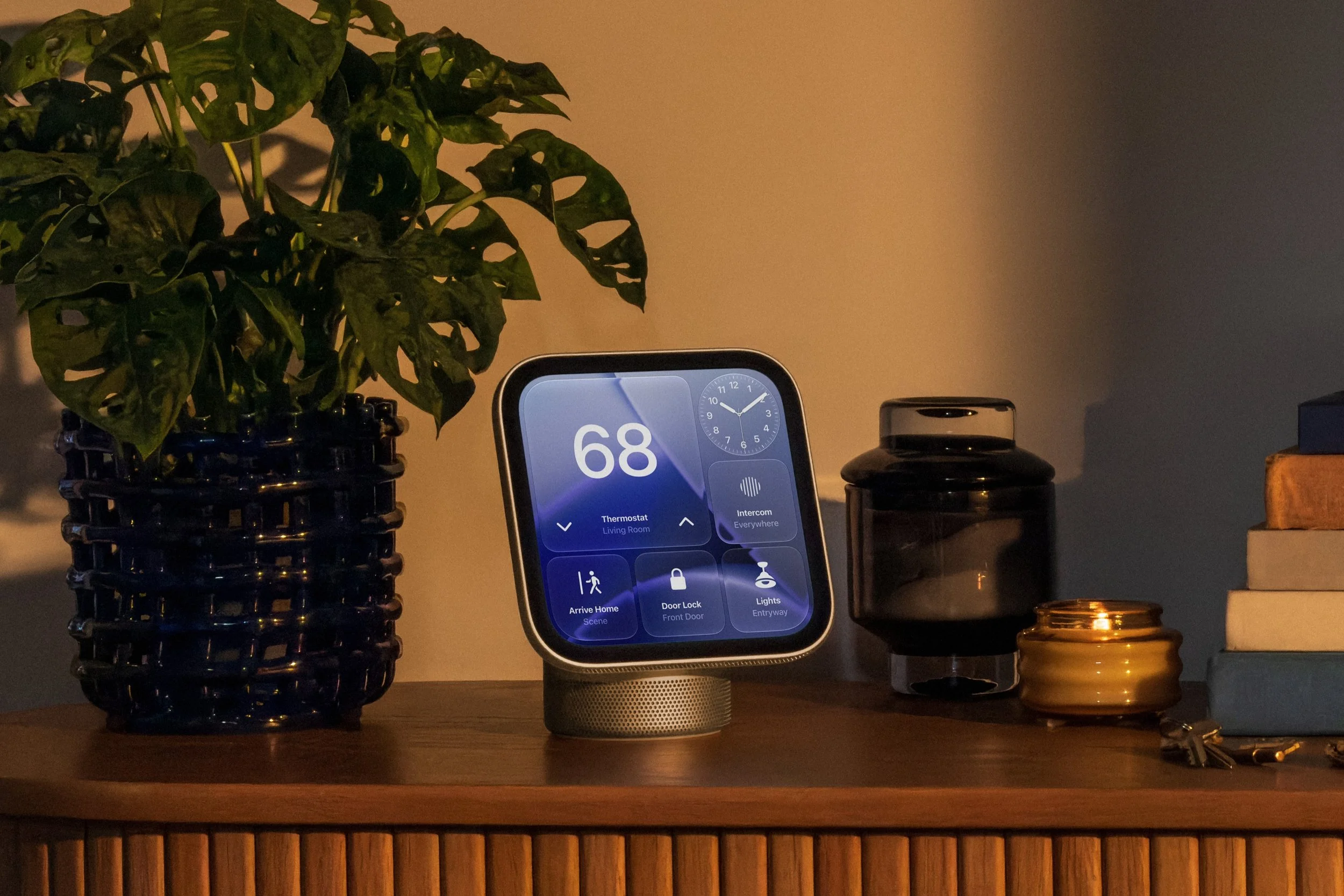
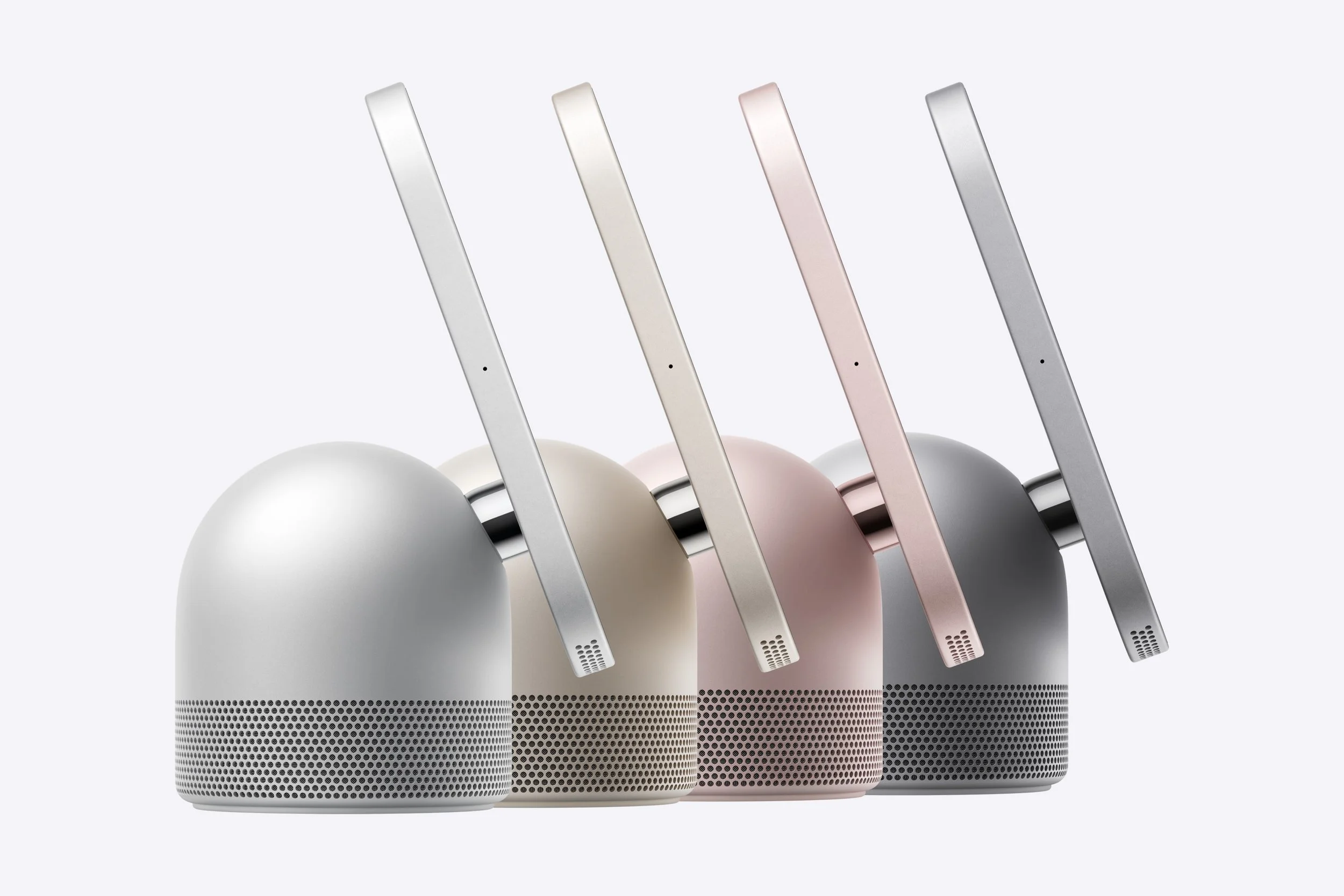
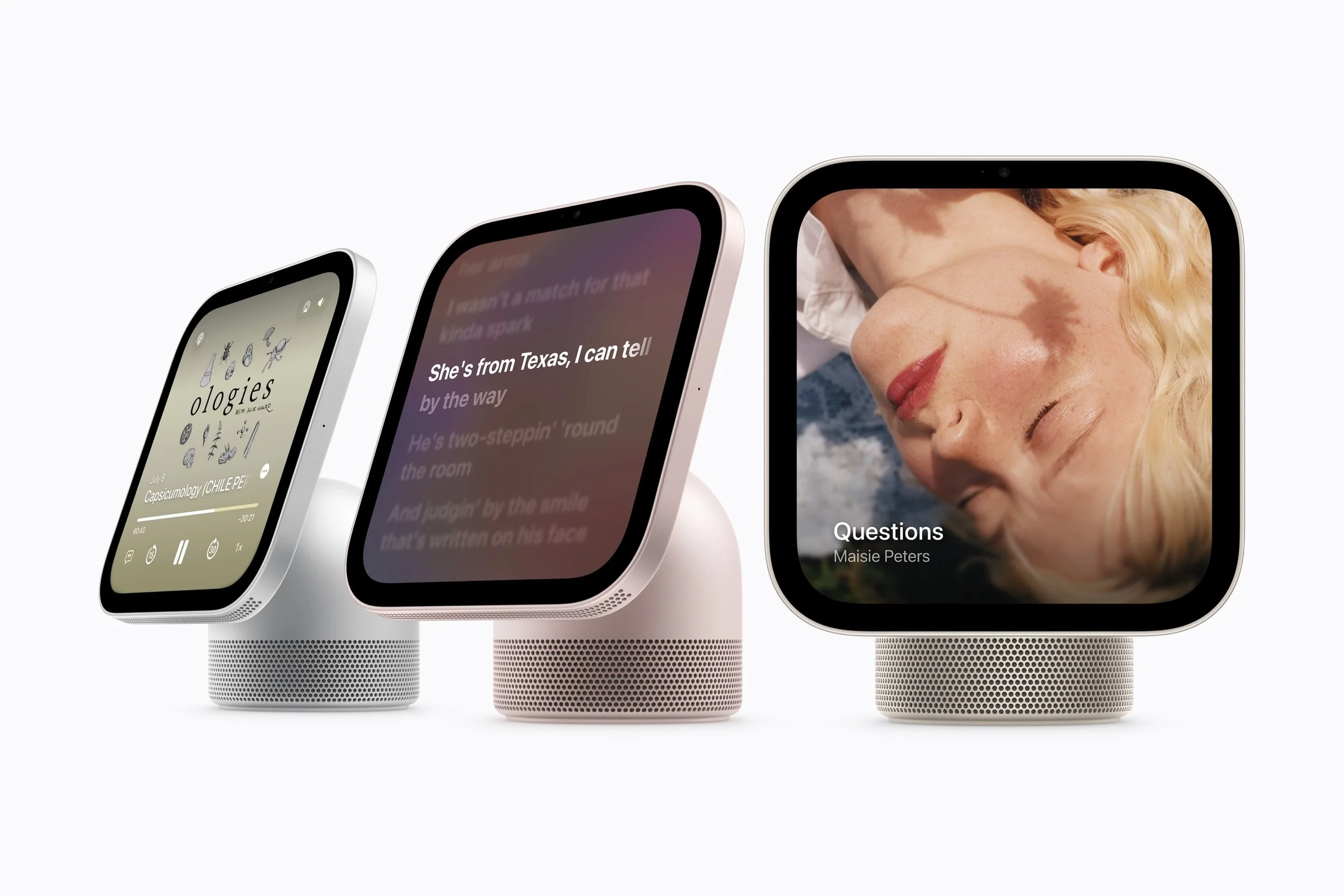
Apple HomeView features an aluminium design with a 7-inch Liquid Retina display connected to a domed speaker base. A stainless steel hinge allows the screen to tilt smoothly, making it easier to find a comfortable viewing angle when placed on a kitchen bench, bedside table or side table.
The display is designed to remain easy to read throughout the day, with adaptive technologies that adjust its appearance to suit changing lighting conditions.
A display that adapts to your surroundings
HomeView includes True Tone technology and automatic brightness adjustment, ranging from 500 nits down to just 0.3 nits.
In practical terms, the display can remain bright and visible in a sunlit room while dimming significantly at night. That makes it suitable for everything from checking a recipe during the day to viewing the time or reminders from your bedside table without an unnecessarily bright screen.
The interface also adapts to how close you are standing. From across the room, HomeView can show simpler information that's easy to read at a glance. As you move closer, it can display more detailed information.
This approach should make the device useful in busy spaces where you don't always have time to interact directly with the touchscreen.
Four colours and two installation options
The standard tabletop Apple HomeView is available in four colours:
Silver
Starlight
Rose Pink
Space Grey
Each colour comes with a matching cable, helping the device blend into different home interiors.
Apple is also introducing a separate wall-mounted HomeView model, available in Silver and Space Grey. It offers the same 7-inch display, core features and rich audio, but is designed for locations such as hallways and entryways.
The wall-mounted model works with three purpose-built mounts from Schneider Home, giving buyers different installation options.
Everyday benefit: You can place HomeView wherever it is most useful, whether that's on the kitchen counter for recipes and timers or near the front door for quick access to security cameras and household controls.
Siri AI: Apple's Smarter Home Assistant
One of the most significant features of Apple HomeView is Siri AI, a substantially redesigned version of Apple's voice assistant powered by the next generation of Apple Intelligence and advanced Apple silicon.
Apple says the new Siri is more capable and conversational, with broader world knowledge, personal context understanding and onscreen awareness.
For everyday users, the goal is to make talking to Siri feel more natural and useful rather than simply issuing a short command and hoping the assistant understands.
Ask questions and discover new music
HomeView's Siri AI can answer questions on a broad range of topics and engage in richer, more natural conversations.
You can also use it to discover music more effectively, making it easier to find songs, artists or playlists that match your interests.
Importantly, Apple says users can benefit from Siri AI's broad world knowledge, natural conversations and improved music discovery even if they don't own an Apple Intelligence-enabled iPhone or iPad.
Personalised assistance with a compatible iPhone or iPad
Pairing HomeView with a compatible Apple Intelligence-enabled iPhone or iPad unlocks additional personal context capabilities.
With the appropriate setup, Siri can draw on relevant information from apps such as Messages and Calendar, as well as Apple Music playlists and other supported app information, to provide more useful responses and help users get things done.
For example, this could help you find relevant information from your personal schedule or messages without manually searching through multiple apps.
Siri's voice expressiveness and speaking pace can also be customised on supported paired devices, with those settings carrying over to HomeView. These customisation options require a compatible device and are available in English.
Continue conversations across Apple devices
Conversations started on HomeView can continue in the Siri app, with history privately synced through iCloud. This allows you to pick up a conversation on a compatible iPhone, iPad, Mac, Apple Watch or Apple Vision Pro.
This cross-device continuity could be particularly useful when you start asking a question at home but want to continue exploring it while away from the house.
Important to know: Siri AI is available in beta in HomeView software version 27.2. Personal context features require a paired Apple Intelligence-enabled iPhone or iPad running the latest software, with Siri AI enabled and a supported language selected. Some Apple Intelligence features may also have daily usage limits, with expanded access potentially available for a fee in the future.
A Personalised Experience for Everyone in the Household
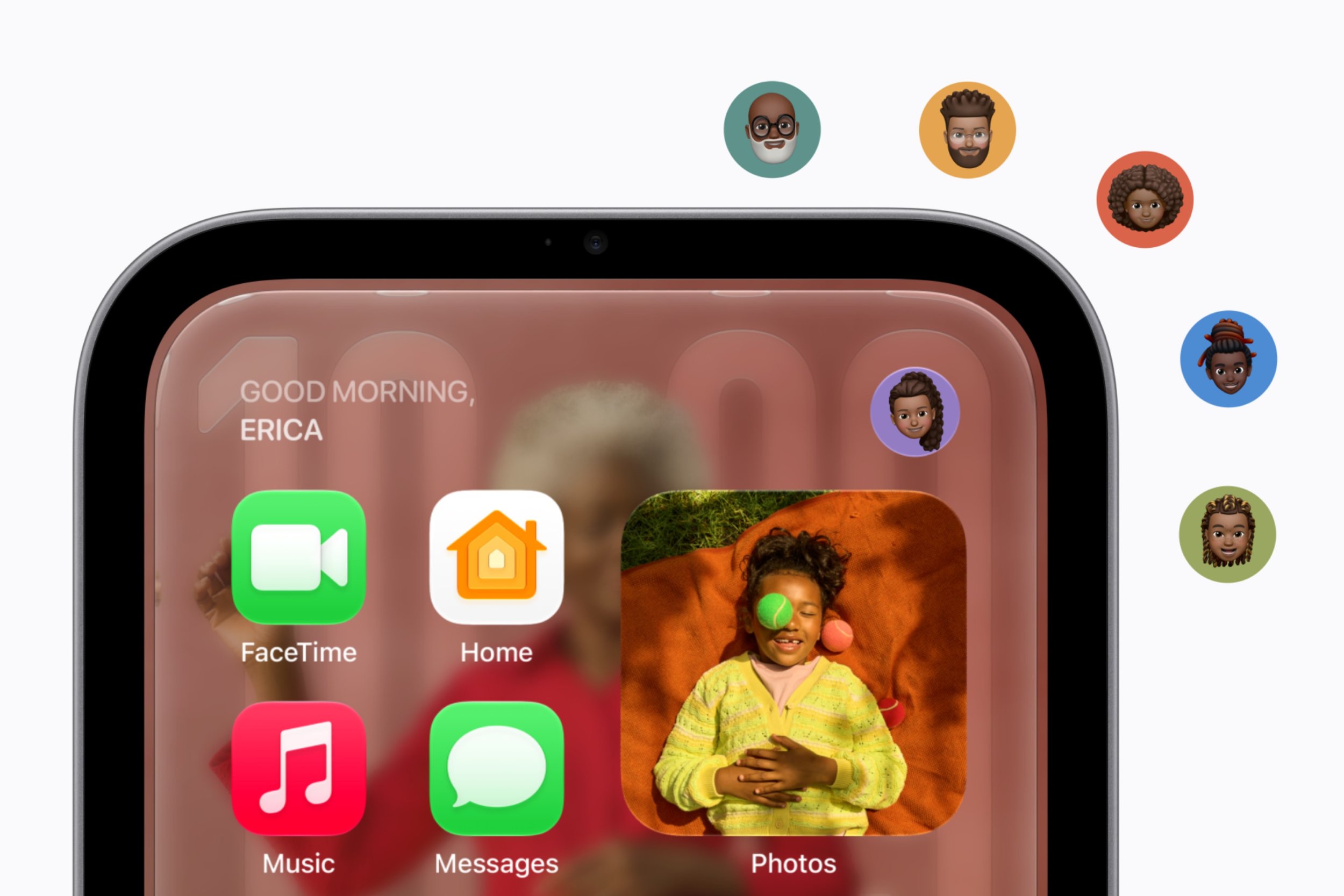
Unlike a conventional shared smart display, Apple HomeView is designed to feel personal to each member of the household.
The device can recognise up to six people by their faces and provide each recognised user with an individual Home Screen, complete with their own apps and widgets.
Supported personal content in apps such as Messages, FaceTime, Calendar, Reminders and Find My can be tailored to the recognised user.
This means family members can access their own information without everyone having to navigate through the same shared interface.
At the same time, shared photo albums and music remain available for the household to enjoy together, including guests.
Personalisation without losing the shared experience
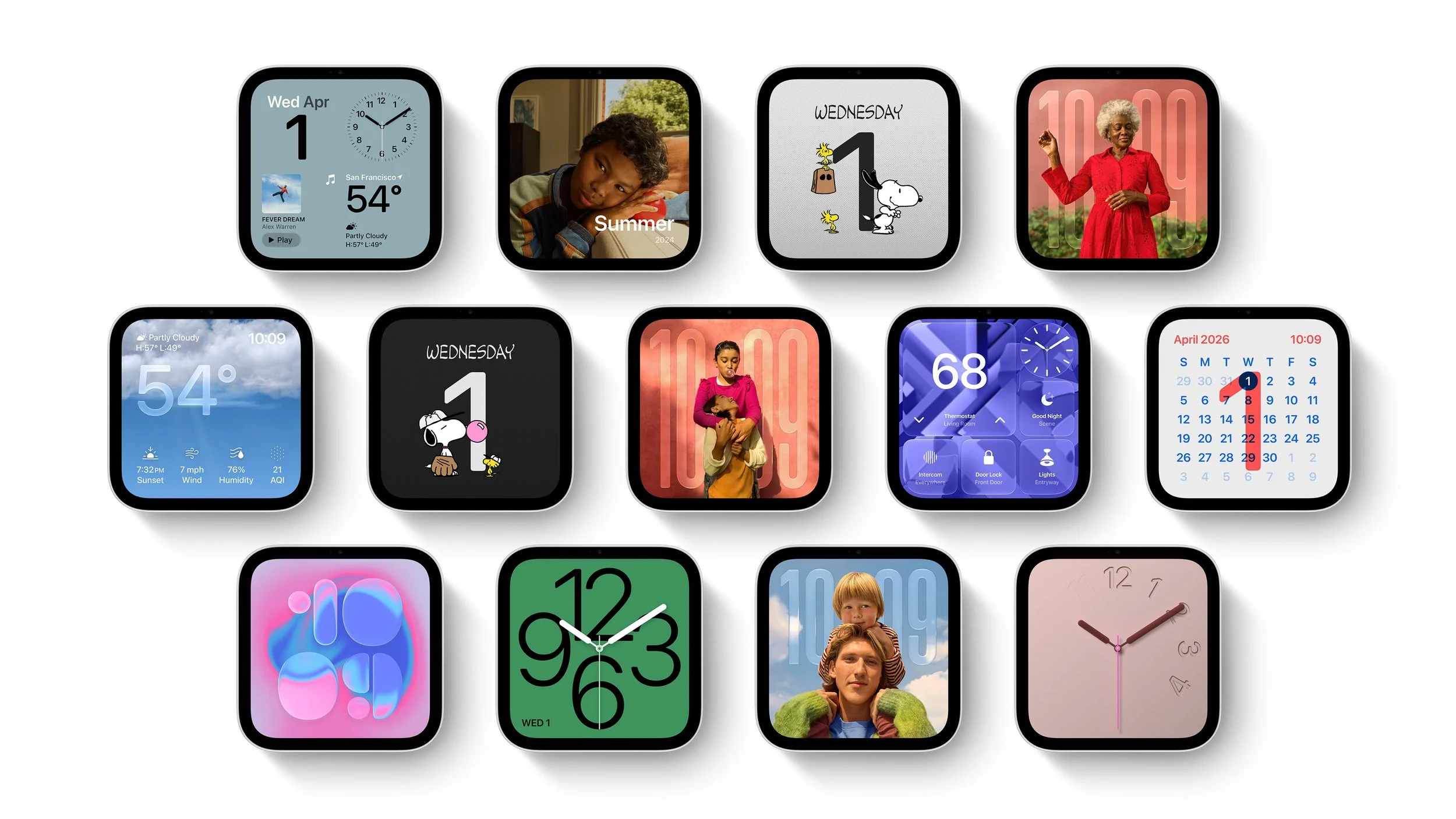
HomeView includes several customisable display faces that combine useful information with visual appeal.
Photos face: Displays favourite memories with Portrait-style depth effects that keep the subject sharp while softly blurring the foreground and background.
Shared photo albums: Turns the display into a digital photo frame that family members and loved ones can contribute to.
Flow face: Creates interactive artwork that responds dynamically to physical presence and movement.
Snoopy face: Features animated Snoopy appearances that reflect the time of day, weather and sporting events.
Home Modular face: Provides convenient access to favourite smart home accessories.
These options help HomeView feel less like a basic screen sitting on a bench and more like a personalised part of the home.
Everyday benefit: Families can enjoy a shared device without necessarily sharing the same personal information, while still having easy access to common entertainment, photos and home controls.
Entertainment With Room-Filling Sound
Apple HomeView isn't just a smart home controller. It is also designed to provide a high-quality listening experience throughout the home.
The tabletop model features a custom-engineered acoustic system with two full-range drivers built into the display, delivering clear audio and Spatial Audio. The speaker base houses a down-firing woofer and two force-cancelling passive radiators designed to provide deeper bass.
Apple silicon and real-time system sensors work together to optimise loudness and bass response at different volume levels.
The wall-mounted version also features two custom drivers and computational audio tuned specifically for its installation position.
Apple Music, podcasts and video
HomeView supports a range of entertainment services, including:
Apple Music, with animated album artwork and lyrics.
Apple Podcasts.
Apple News.
Apple TV.
Compatible third-party audio and video apps.
Subscriptions may be required for some content and services, and application availability can vary by region.
For music lovers, HomeView also supports Handoff. You can bring your iPhone near the display to continue listening to a song you were playing while travelling in the car or out for a walk.
If you want music throughout your home, multiple HomeView devices can work alongside HomePod, HomePod mini and AirPlay-compatible speakers for multiroom audio.
Everyday benefit: HomeView can serve as a convenient music and entertainment hub without requiring a separate smart speaker and display in the same room.
Stay Connected With FaceTime, Messages and Intercom
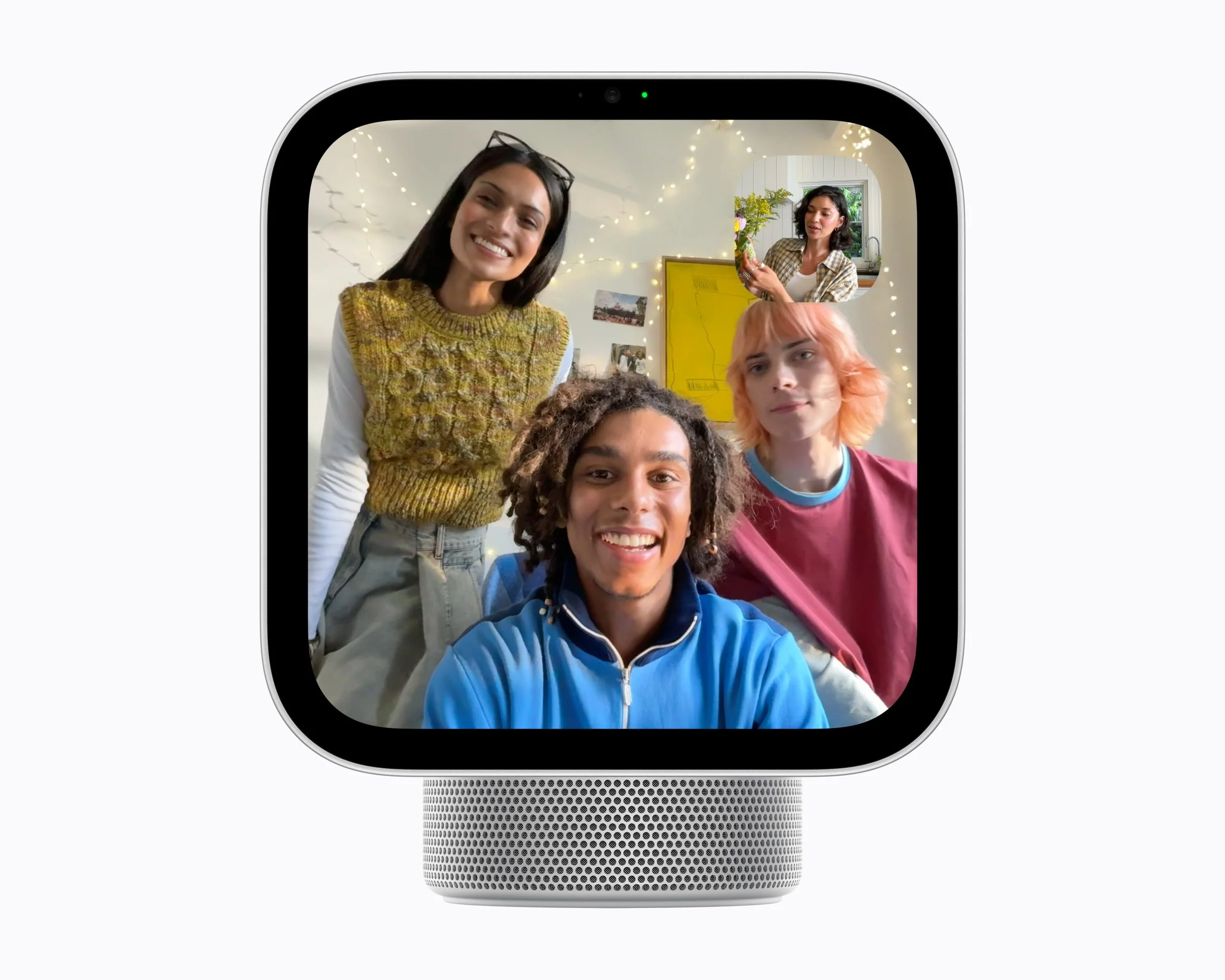
Apple HomeView is designed to help households stay connected, whether family members are in different rooms or catching up with people elsewhere.
FaceTime with Centre Stage
The device supports FaceTime video calls with Centre Stage, which helps keep participants framed as they move around the room.
That could be useful when chatting with family while preparing dinner or moving around the kitchen, rather than having to remain perfectly still in front of the screen.
FaceTime requires a compatible device at the other end of the call and a Wi-Fi connection.
Messages without picking up your iPhone
Messages can be read and answered using your voice or the onscreen keyboard.
This offers a convenient way to respond to messages while your hands are occupied, although voice and personal-content functionality depends on the relevant setup and compatibility requirements.
Intercom for the whole house
Intercom lets you broadcast a quick announcement to a specific room or the entire home.
Messages can reach other HomeView and HomePod speakers, as well as personal devices such as iPhone, iPad and Apple Watch.
Whether you're letting everyone know dinner is ready or asking someone to come downstairs, Intercom can help reduce the need to shout from one end of the house to the other.
Live Activities and Find My
HomeView can surface useful updates through Live Activities, including the song currently playing, an active timer or an incoming Intercom message from another room.
Find My also allows users to check the locations of people who have chosen to share their location, or locate a misplaced iPhone, AirPods charging case or personal item fitted with an AirTag.
Together, these features help make HomeView a useful everyday information screen, rather than a device you only interact with when changing a setting.
Your Kitchen Assistant: Recipes, Timers and Hands-Free Help
The kitchen is one of the spaces where Apple HomeView could prove particularly useful.
The device can turn recipes from the web into step-by-step instructions, with hands-free timer control and assistance with ingredient tracking.
Instead of repeatedly picking up your phone to check the next step, you can follow instructions on the display while keeping your hands focused on preparing food.
You can also use timers and voice controls to help manage different stages of a meal.
For busy households, these capabilities could make HomeView a practical kitchen companion, especially when preparing more complicated recipes or juggling multiple dishes.
The benefit is simple: less time switching between your phone and the task at hand, and more convenient access to the information you need.
Smart Home Control: The Centre of Your Connected Home
HomeView's smart home capabilities are among its most important features.
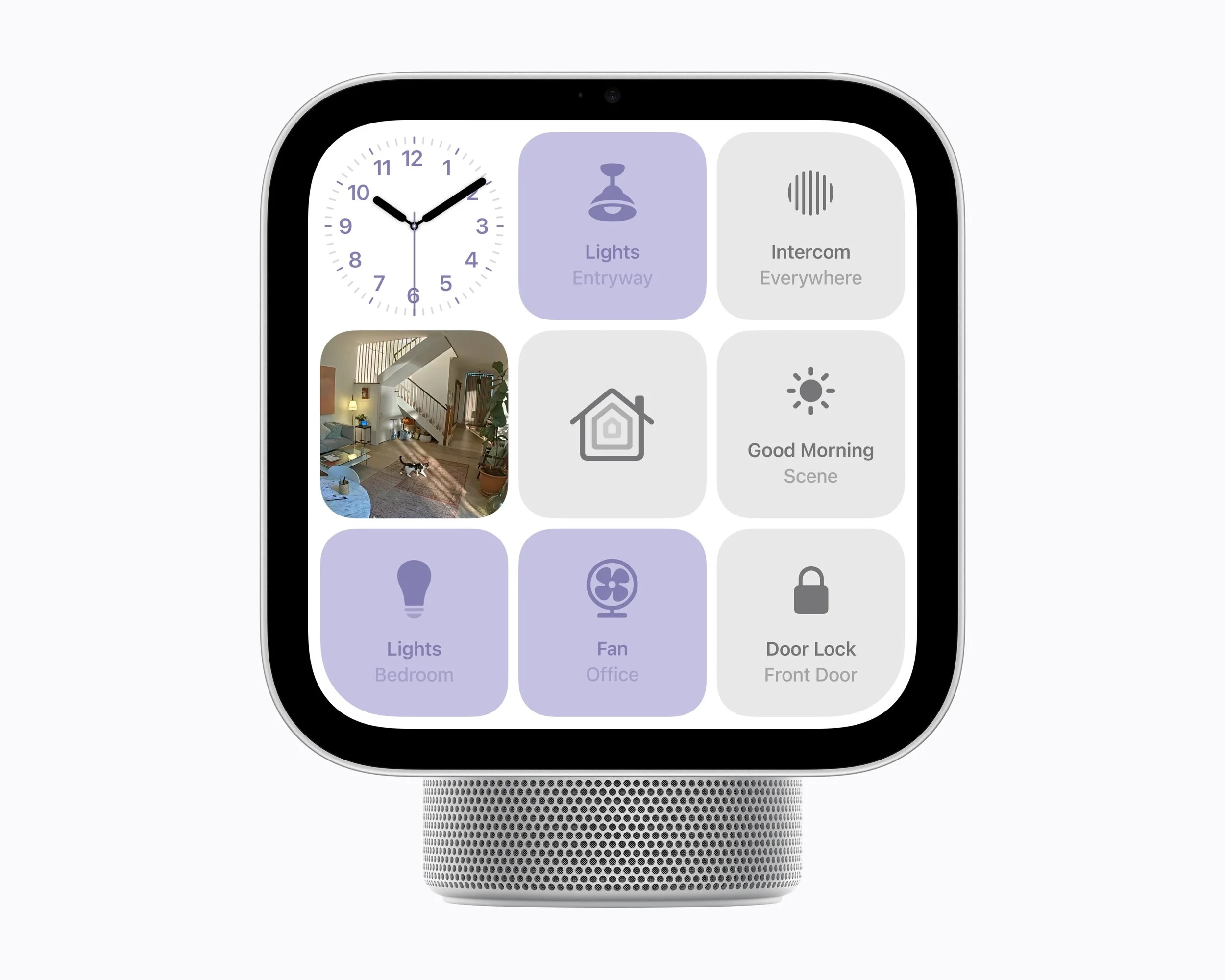
The device can act as a central dashboard for compatible accessories, allowing you to control your home using either the touchscreen or Siri AI.
Depending on the accessories installed, you can use it to:
Adjust compatible smart lights.
Lock supported smart locks.
Close compatible blinds.
View connected security camera feeds.
Access favourite accessories through the Home Modular face.
Manage other compatible smart home devices.
The device supports compatible Works with Apple Home and Matter accessories, giving users options when building or expanding a smart home.
Accessories are sold separately, and functionality depends on device compatibility and regional availability.
View up to nine camera feeds at once
The Home Camera face can display live video from up to nine camera feeds simultaneously.
This could be useful for monitoring a front entrance, checking on deliveries or keeping an eye on pets playing in the backyard.
Rather than opening a separate app on your phone each time, HomeView gives you a dedicated screen for checking what is happening around your property.
Smarter security notifications
With compatible cameras and a supported iCloud+ subscription, HomeView can provide intelligent, end-to-end encrypted recognition for people, familiar faces, pets, packages and vehicles.
This allows the household to receive notifications when someone arrives at the front door or when other supported events are detected.
For HomeKit Secure Video footage, video descriptions can also help users understand what happened in a recorded clip without having to watch the entire video.
Some of these advanced capabilities require setup with an Apple Intelligence-enabled iPhone or iPad and an eligible iCloud+ plan. The number of supported cameras and available features can vary according to the subscription.
Smoke and carbon monoxide alarm detection
HomeView can detect the sound of smoke or carbon monoxide alarms and send alerts to your iPhone, iPad or Apple Watch.
This adds another layer of awareness around the home, potentially helping you notice an alarm when you're in another room.
However, this feature should be treated as an additional notification capability, not a replacement for properly installed and maintained smoke alarms, carbon monoxide detectors or other dedicated safety equipment.
Apple Home Collection: Expanding the Smart Home Ecosystem
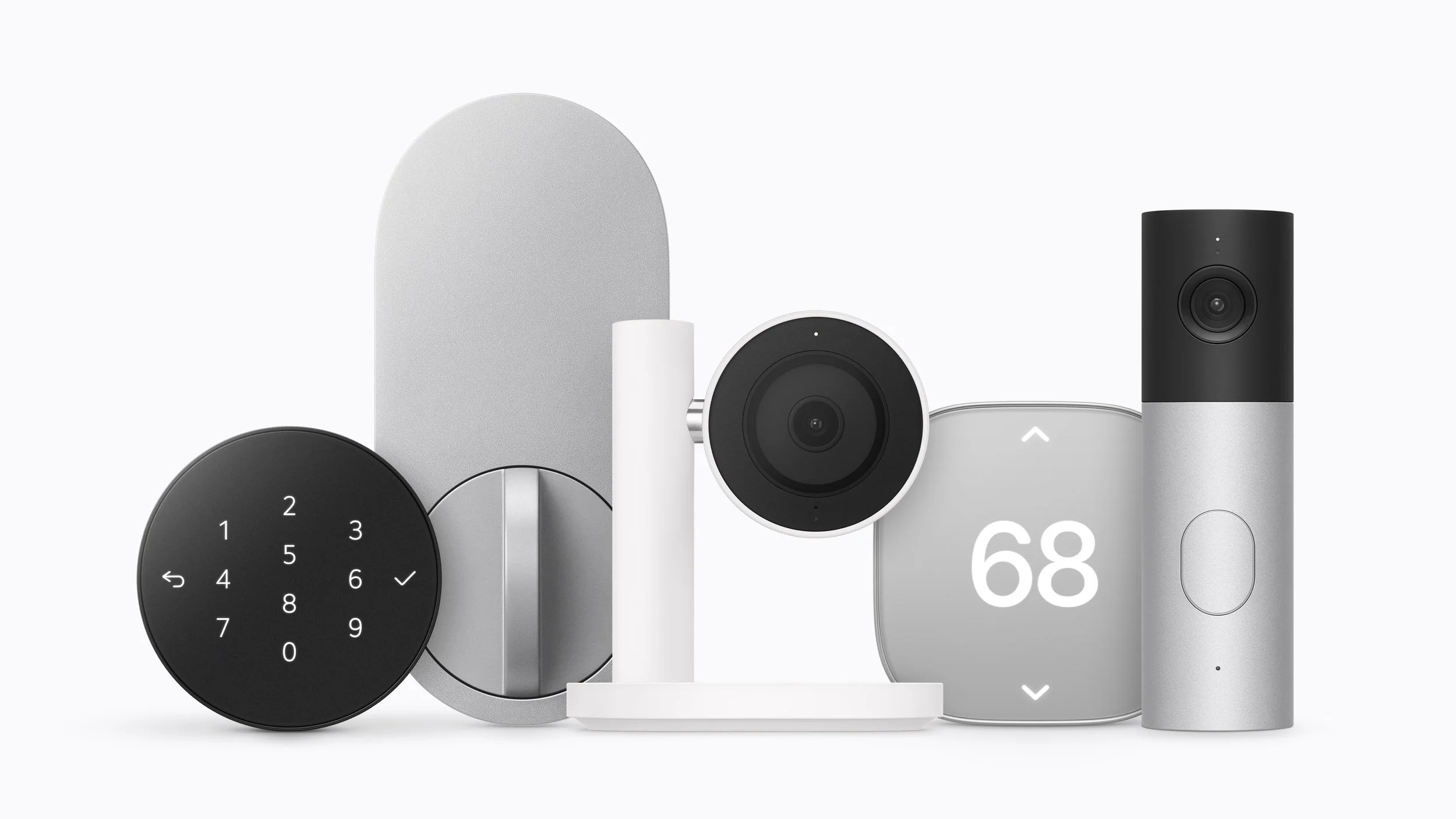
Alongside HomeView, Apple has introduced Apple Home Collection, a new range of smart home cameras, thermostats and a smart lock developed in collaboration with LG Electronics and Schneider Electric.
The collection is designed to work alongside HomeView and other compatible Apple Home products, helping users monitor their homes, manage access and control indoor temperatures.
Apple says the wider ecosystem will also work with compatible Works with Apple Home and Matter accessories.
Australian availability considerations
Although HomeView is launching in Australia, the initial availability of Apple Home Collection accessories is more limited.
According to Apple's announcement:
The video doorbell and camera range will initially be available in the United States, Canada and the United Kingdom.
The smart deadbolt lock and smart thermostat will initially be available in the United States and Canada.
Apple Home Collection will begin arriving from December, with selected accessories following in early 2027.
Australian customers should therefore check local availability before planning a new smart home setup around these particular accessories. Existing compatible Apple Home and Matter devices provide alternative options, subject to their individual requirements.
Privacy and Security: Designed for a Shared Household
Smart displays can raise legitimate privacy questions, particularly when they include cameras, microphones and access to personal messages or calendars.
Apple says privacy and security are central to HomeView's design, with protections intended to keep individual household information separate even when multiple people use the same device.
Secure Exclaves and the A18 chip
HomeView is powered by Apple's A18 chip, which includes Secure Exclaves: protected, compartmentalised environments designed to process camera and microphone data separately from the rest of the system.
Apple says data processed and analysed within these protected environments cannot be accessed by HomeView software, apps, the user or Apple.
This is designed to help isolate sensitive processing from the rest of the device.
Personal information is restricted
Personal information in apps such as Messages and Calendar is only surfaced when the enrolled user is recognised by their face and their paired iPhone or iPad is present and has been recently unlocked.
Apple also says Siri requests can be processed directly on the device or through Private Cloud Compute.
When Private Cloud Compute is used, Apple says the data is not stored or made accessible to Apple or anyone else.
These protections are particularly relevant for households where a single screen is shared by adults, children and visitors.
As with any connected device, however, users should review their settings, understand which features they enable and ensure their connected accounts and accessories are properly secured.
Environmental Considerations
Apple says HomeView was developed as part of its broader goal of becoming carbon neutral across its entire footprint by 2030.
The company highlights several recycled materials used in the device, including:
100 per cent recycled aluminium in the tabletop enclosure base and the enclosure of the wall-mounted model.
100 per cent recycled gold plating and tin solder in Apple-designed printed circuit boards.
100 per cent recycled rare earth elements in all magnets.
Paper packaging that is 100 per cent fibre-based and designed to be recycled.
Apple also says HomeView meets its standards for energy efficiency and safe chemistry.
These measures may appeal to consumers who consider the environmental impact of their technology purchases, although the announcement does not provide a complete lifecycle emissions figure for the device.
Apple HomeView: Australian Pricing and Availability
Apple HomeView is available to pre-order in Australia from 15 October 2026, with both models scheduled to become available on Friday, 13 November 2026.
Here is the Australian pricing announced by Apple.
Model or accessory Australian RRP (including GST)
Apple HomeView — tabletop model $449
Apple HomeView — wall-mounted model $449
Power Mount USB-C Wall Connector From $94.95
Power Mount AC Wired From $124.95
Power Mount PoE Wired $199.95
The tabletop model is available in Silver, Starlight, Rose Pink and Space Grey. The wall-mounted version is available in Silver and Space Grey.
Pre-orders are available through the Australian Apple Store online and the Apple Store app.
The wall-mounted version requires a compatible mount, which is sold separately. The Power Mount PoE Wired option is scheduled to become available in early 2027.
Australian buyers should also note that Siri AI is supported in English in Australia, while some features, apps, services and accessories may have regional or language restrictions.
Is Apple HomeView Worth Considering?
Apple HomeView brings together several technologies that many households currently use separately. Its combination of a smart display, AI-powered voice assistant, entertainment system, video calling device and home automation dashboard could make it a useful addition to a connected home.
Its biggest strengths are the personalised experience for up to six people, the ability to manage compatible smart home accessories from a central location, and the integration with Apple's existing ecosystem.
For families, the shared photo displays, FaceTime, Intercom and individual Home Screens could make it useful throughout the day. For smart home enthusiasts, the ability to view up to nine camera feeds and control compatible accessories from one interface is particularly appealing. And for anyone who spends a lot of time in the kitchen, recipes, timers and hands-free assistance could prove genuinely practical.
There are, however, a few considerations before purchasing. Advanced personal-context features require a compatible Apple Intelligence-enabled iPhone or iPad, some security features depend on an eligible iCloud+ subscription, and smart home accessories may require additional spending. Siri AI is also launching in beta, so its capabilities and experience may evolve through future software updates.
At $449, HomeView is not simply a basic smart speaker with a screen. It is a more comprehensive home device designed to connect entertainment, communication and automation in a single place.
For households already invested in Apple's ecosystem, it could be a compelling way to make everyday tasks more convenient. For those starting from scratch, the value will depend on how many of its features they expect to use and whether they are prepared to invest in compatible accessories.

Final Thoughts
Apple HomeView represents an ambitious expansion of Apple's smart home offering, combining a 7-inch Liquid Retina display, richer Siri AI interactions, personalised household experiences, room-filling audio and extensive smart home controls.
Its promise is straightforward: make the home easier to manage, make everyday information more accessible and let each household member enjoy a more personal experience from a shared device.
The privacy-focused design is an important part of that proposition, particularly for a product intended to sit in a shared living space. Meanwhile, its entertainment, communication and smart home capabilities give it a broader role than a conventional smart display.
With Australian pricing starting at $449 and availability beginning 13 November 2026, Apple HomeView will be worth watching for consumers looking to build a smarter, more connected home.
The biggest question is whether its combination of AI, personalisation and home automation delivers enough everyday value to justify the price. For Apple households that already use compatible devices and accessories, HomeView could be a natural next step.
What do you think of Apple's new HomeView? Would you add a smart display like this to your home, or do you prefer managing everything from your iPhone? Let us know in the comments.